⚡ Instant Delivery — Genuine Microsoft Product Keys Emailed in Seconds

Volume Licences | Bulk orders

Office 2010 Professional Plus Download: How to Install & Activate

The Microsoft Office 2010 Professional Plus download gives you a stable, perpetual version of Office — fully installed Word, Excel, PowerPoint, Outlook and OneNote with a one-time purchase and no Microsoft 365 subscription. In this step-by-step guide, we’ll show you how to download, install, and activate Office 2010 Professional Plus on Windows in about fifteen minutes.

Don’t have a key yet? Get a genuine Microsoft Office 2010 Professional Plus product key from Flixeasy — delivered by email within seconds together with your download link. Lifetime activation, no subscription.

System requirements

RequirementDetails
Operating systemWindows 10, Windows 8.1, Windows 7, Vista SP2, Windows XP SP3 (32/64-bit)
Processor500 MHz or faster x86/x64 processor
RAM256 MB RAM minimum (512 MB for advanced features)
Disk space3.0 GB available disk space per PC
Display1024 x 768 screen resolution / DirectX 9.0c

Office 2010 Professional Plus is Windows-only. Mac users should choose Office for Mac instead. Also uninstall any previous Office version (including OneNote) before starting, then restart your PC — leftover installations are the most common cause of failed installs.

Office 2010 Standard vs Professional Plus — which one do you have?

FeatureStandard LTSCProfessional Plus LTSC
Word, Excel, PowerPoint
Outlook, OneNote
Microsoft Access
License typeOne-time purchase, perpetualOne-time purchase, perpetual

Step 1 — Download the Office 2010 Professional Plus installer

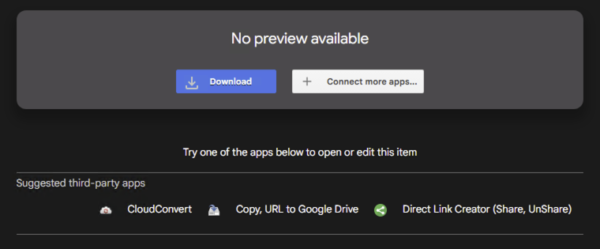
    1. Download the installation package using the download link we share with you in your delivery email — it’s matched to your license, so this is the link you should use.
    2. Click the “Download” button
Office 2010 Professional Plus Download: How to Install & Activate 9
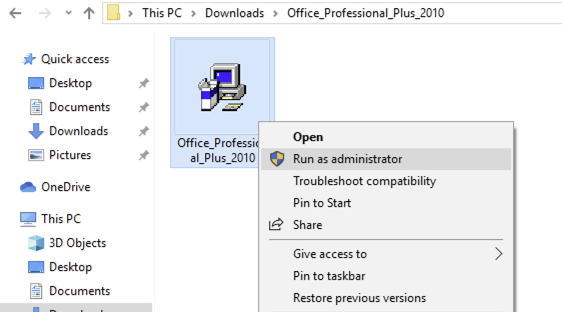
  1. Extract the package if needed, locate the file setup.bat, right-click it and choose “Run as administrator”.
Office 2010 Professional Plus Download: How to Install & Activate 2

Step 2 — Wait for the activation to complete

Let the installer finish — it downloads and configures the Office Professional Plus suite, which can take several minutes depending on your connection.

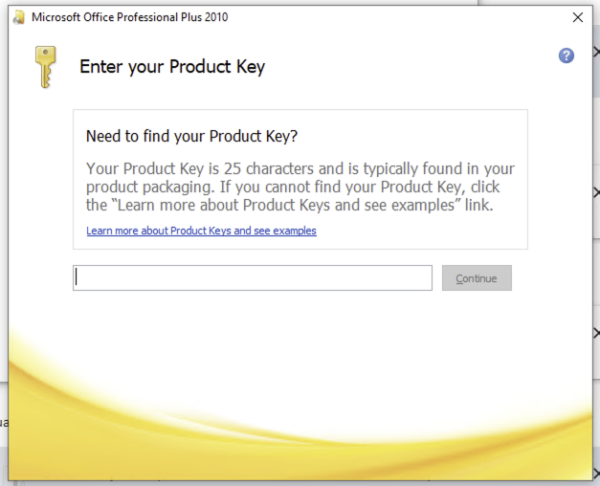
  1. You will be asked to enter the License key
Office 2010 Professional Plus Download: How to Install & Activate 3
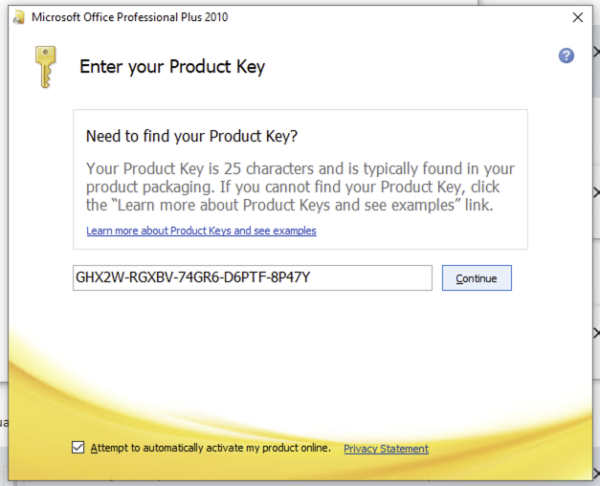
  1. Then prompted, enter the 25-character product key from your Flixeasy delivery email, Then click on “Continue”
Office 2010 Professional Plus Download: How to Install & Activate 4
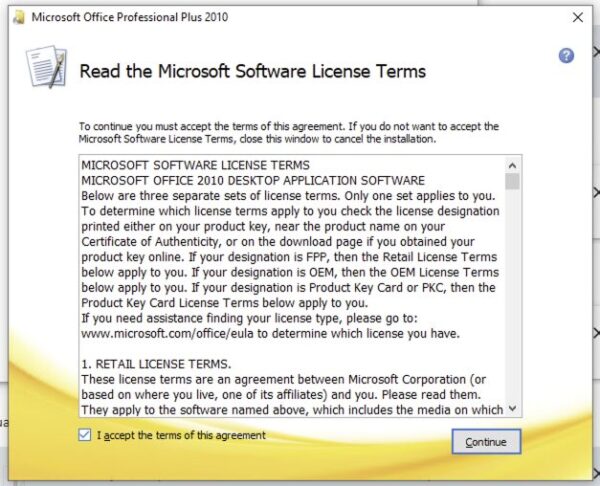
  1. Accept the license agreement when prompted, then click Continue.
Office 2010 Professional Plus Download: How to Install & Activate 5
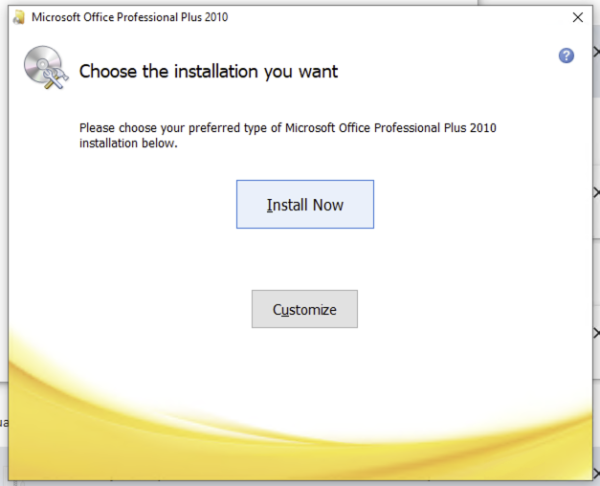
  1. In this step you have two options here: “Install Now” or “Customize”. Clicking on the Install Now button will start the installation of Office 2010 on your Windows drive. If your Windows drive does not have enough free space (at least 4 GB for Professional Plus), click the Customize button to select another drive as the installation location
  2. The Customize option also allows you to choose which Office applications to install. If you don’t want to install one or two Office applications from the suite, this is a good option. Finally, click the Install button to start the installation of the Office product.

Office 2010 Professional Plus Download: How to Install & Activate 6

Step 3 — Final Install Office 2010 Professional Plus

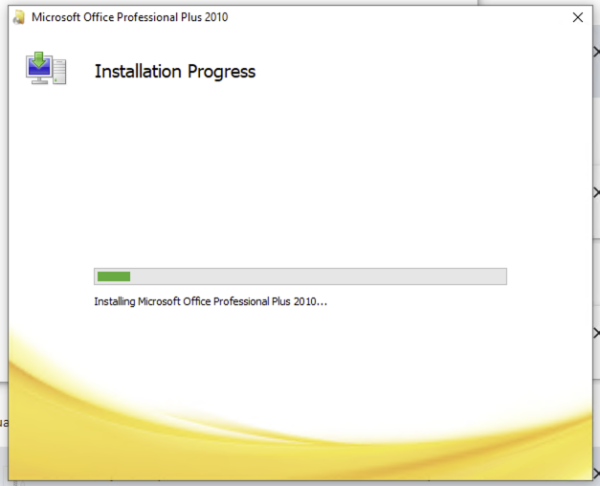
  1. The Final installation will start, wait for the process to finish
Office 2010 Professional Plus Download: How to Install & Activate 7
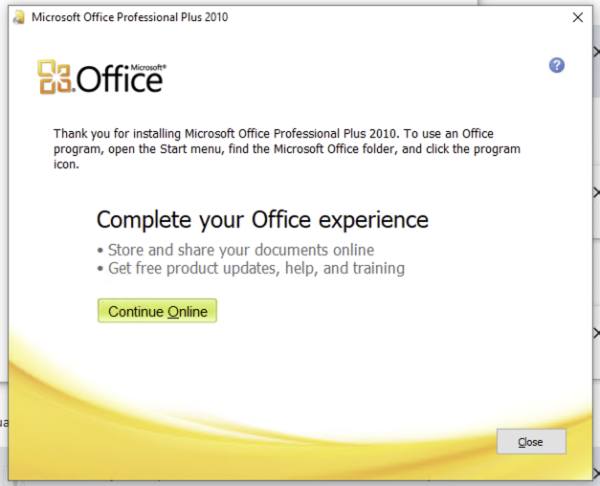
  1. Once finished, Click on “Close” Button
Office 2010 Professional Plus Download: How to Install & Activate 8

Frequently asked questions

How does a 5 PC license key work for Microsoft Office 2010 Professional Plus?

A 5 PC license key is a multi-device commercial product key configured to allow up to 5 separate activations on 5 individual Windows computers. Each PC gets its own complete, independent installation of ms office professional plus 2010.

Is Office 2010 Professional Plus a lifetime license?

Yes — a perpetual, one-time purchase with no expiry date, no renewal fees and no subscription.

What’s the difference between Office 2010 Standard and Professional Plus?

Professional Plus adds Microsoft Access on top of Standard’s Word, Excel, PowerPoint, Outlook and OneNote. If you don’t need a desktop database, Standard covers everything most users touch daily.

Do I need a Microsoft account?

No — Office 2010 Professional Plus activates with your product key directly, and the telephone method works entirely without an account.

Can I install it on a Mac?

No — it runs on Windows XP and higher only. For Apple devices, see our Office for Mac keys.

What applications are included in Microsoft Office 2010 Professional Plus?

Each of your 5 licensed computers receives full desktop versions of Word 2010, Excel 2010, PowerPoint 2010, Outlook 2010, Access 2010, Publisher 2010, OneNote 2010, InfoPath 2010, and SharePoint Workspace 2010.

Does Office work offline after activation?

Yes — internet is only needed for the download and activation. After that, the full suite works completely offline.

Get your Office 2010 Professional  Plus key

Genuine product key with instant email delivery, download link included, lifetime activation and no subscription.

Buy Office 2010 keys

Browser Our Products Cateregories

Our Best Selling Products

Your Cart (2)
Empty Cart Your Cart is Empty!

It looks like you haven't added any items to your cart yet.

Browse Products
Subtotal
Shipping & taxes calculated at checkout.
$24.98
Checkout Now